Why a disk, not a clock: a timer for time blindness
A visual countdown timer for kids and adults
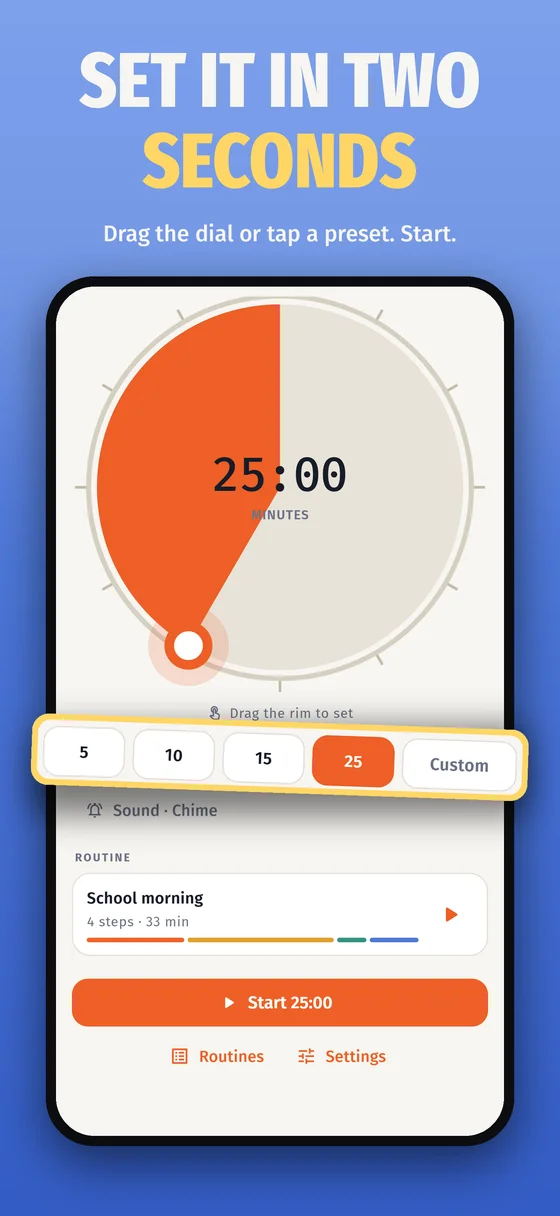
A four-year-old and a tired adult both see "about half left". Digits make you do the subtraction.
The colour warns you
The last stretch shifts toward red, so the end does not ambush you.
A routine timer for ADHD, step by step
Get dressed, breakfast, shoes: one disk per step, and the next one starts itself.
Project it
Full screen on a classroom board or a shared monitor; it stays awake and keeps true time in a background tab.
Free, and what Pro adds
Free
The whole single timer: the disk, presets, alerts and the warning colour, plus one saved routine of up to three steps. On the web and in the app.
Pro in the app
Unlimited routines and steps, themes including kid mode, and a sound per timer or step. Bought in the app; sync your phone and Pro opens in the browser too. Nothing is sold on the web.
Take it off the screen
- The countdown on your lock screen
- Alarms that sound with the screen off
- Runs with no signal, in the car or the classroom
- Your web routines, carried over in one scan
🎁 A free month for you and a friend
Invite a friend from the Time Blindness Timer phone app and you both get 30 days of Time Blindness Timer Pro, free.
- Install Time Blindness Timer on your phone.
- Open Invite a friend and share your code.
- Got a code from a friend? Enter it under Have an invite code? within 14 days of installing.
Invites are redeemed in the phone app. How invites work
Already use Time Blindness Timer on your phone? Sync it here
Open the web app, go to Settings and choose Sync with your phone. In the app open Settings, choose Sync with the web and point the camera at the code. Routines are merged, Undo last sync holds for a day, and a Pro phone unlocks Pro in that browser. Syncing is free.
Private by design
There is no account. Timers and routines are kept in this browser's own storage on this device and are never sent to Adelyons or anyone else. A sync with your phone crosses our relay once, encrypted with a key only your two screens hold, and is deleted as soon as it is read. We count page visits and which buttons are pressed, never what you name a routine. Time Blindness Timer privacy policy.
Guides and more timers
Questions
Is the visual timer free?
Yes. The timer on this page and the Time Blindness Timer web app are free with no sign-up and no ads. The web app has the full single timer and one saved routine of up to three steps, the same free plan as the phone app. More routines, themes and per-step sounds come with Time Blindness Timer Pro in the app.
Does it work full screen on a classroom board?
Yes. Press Full screen and the disk and the countdown fill the display. While a timer runs the page asks the browser to keep the screen on, and it keeps the right time even when the tab is in the background.
Why a disk instead of a clock?
A disk shows how much time is left at a glance, without reading digits or doing subtraction. That helps young children, people with ADHD or time blindness, and anyone watching from across a room. The colour warms toward red in the last stretch, so the end does not arrive as a surprise.
Is Time Blindness Timer a visual timer for kids, ADHD adults and autism?
Yes, that is who it was built for. A disk shows how much time is left without reading digits, which helps kids in transitions, adults with ADHD or time blindness, and many autistic kids and adults who do better with a picture of time. It is a timer, not a treatment.
Can I move my routines to the phone app?
Yes, and back again. In the web app open Settings and choose Sync with your phone; in the Time Blindness Timer app open Settings, choose Sync with the web and point the camera at the code. Routines are merged and Undo last sync holds for a day. If your phone has Pro, Pro opens in that browser too.
What does the phone app add?
A countdown on the lock screen, alarms that sound with the screen off, and it runs with no signal. Time Blindness Timer Pro adds unlimited routines and steps, themes including kid mode, and a sound per step.
Is anything I type sent anywhere?
No. Timers and routines stay in your browser. A sync with your phone crosses our relay once, encrypted with a key only your two screens hold, and is deleted as soon as it is read. We count page visits and button presses, never the names of your routines.